

Configure an email provider once for your Rondyr instance, add recipients to a form under Destinations, and confirm each address. From then on, Rondyr emails every accepted message (and any quarantined message you accept later) to those recipients as plain text.
1. Set up an email provider
Rondyr supports Resend (the default) and Cloudflare Email Sending. Pick one for your instance.
Option A: Resend (default)
You need a Resend account and a domain whose DNS records you can edit.
-
In Resend, add a sending domain (a subdomain such as
notifications.example.comkeeps form mail separate from your main domain’s reputation). -
Add the SPF and DKIM DNS records Resend gives you, unproxied if your DNS is on Cloudflare, and wait for verification.
-
Create an API key in Resend with Sending access restricted to that domain, and copy it right away.
-
In your Cloudflare dashboard, open Workers & Pages → rondyr → Settings → Variables and Secrets and add:
Name Kind Value RESEND_API_KEYSecret Your Resend API key ( re_…)RONDYR_EMAIL_FROMVariable A bare sender address on the verified domain, such as forms@notifications.example.com -
Save to deploy the settings.
On an Alchemy deployment, set RESEND_API_KEY_PROD and RONDYR_EMAIL_FROM_PROD in your fork’s GitHub secrets and variables, then run the Deploy workflow.
Use a bare email address for RONDYR_EMAIL_FROM without a display name; values like Rondyr <forms@example.com> are rejected.
Option B: Cloudflare Email Sending
Requires Workers Paid and a sender domain whose DNS is on Cloudflare in the same account.
-
In the Cloudflare dashboard, open Compute → Email Service → Email Sending, select Onboard Domain, and finish domain verification.
-
In your Rondyr repository’s root
wrangler.json, add this top-level field and push tomain:"send_email": [{ "name": "CLOUDFLARE_EMAIL" }],The Update Rondyr workflow preserves this entry when you update later. (If you deploy with Alchemy, skip editing
wrangler.json; Alchemy adds this automatically when you set the variables below.) -
Under Settings → Variables and Secrets (or
*_PRODin GitHub for Alchemy), setRONDYR_EMAIL_PROVIDERtocloudflareandRONDYR_EMAIL_FROMto a bare address on your onboarded domain, such asforms@notifications.example.com. -
Keep Cloudflare’s Drop suppressed recipients option off if you want Rondyr to mark suppressed addresses as failed deliveries.
2. Add an email destination to a form
- Open Settings → Destinations in the Rondyr dashboard (admins only) and select your form.
- Under Emails, enter 1 to 10 bare email addresses (one per line, no display names or angle brackets), pick the Email language (English or French), and select Add destination.
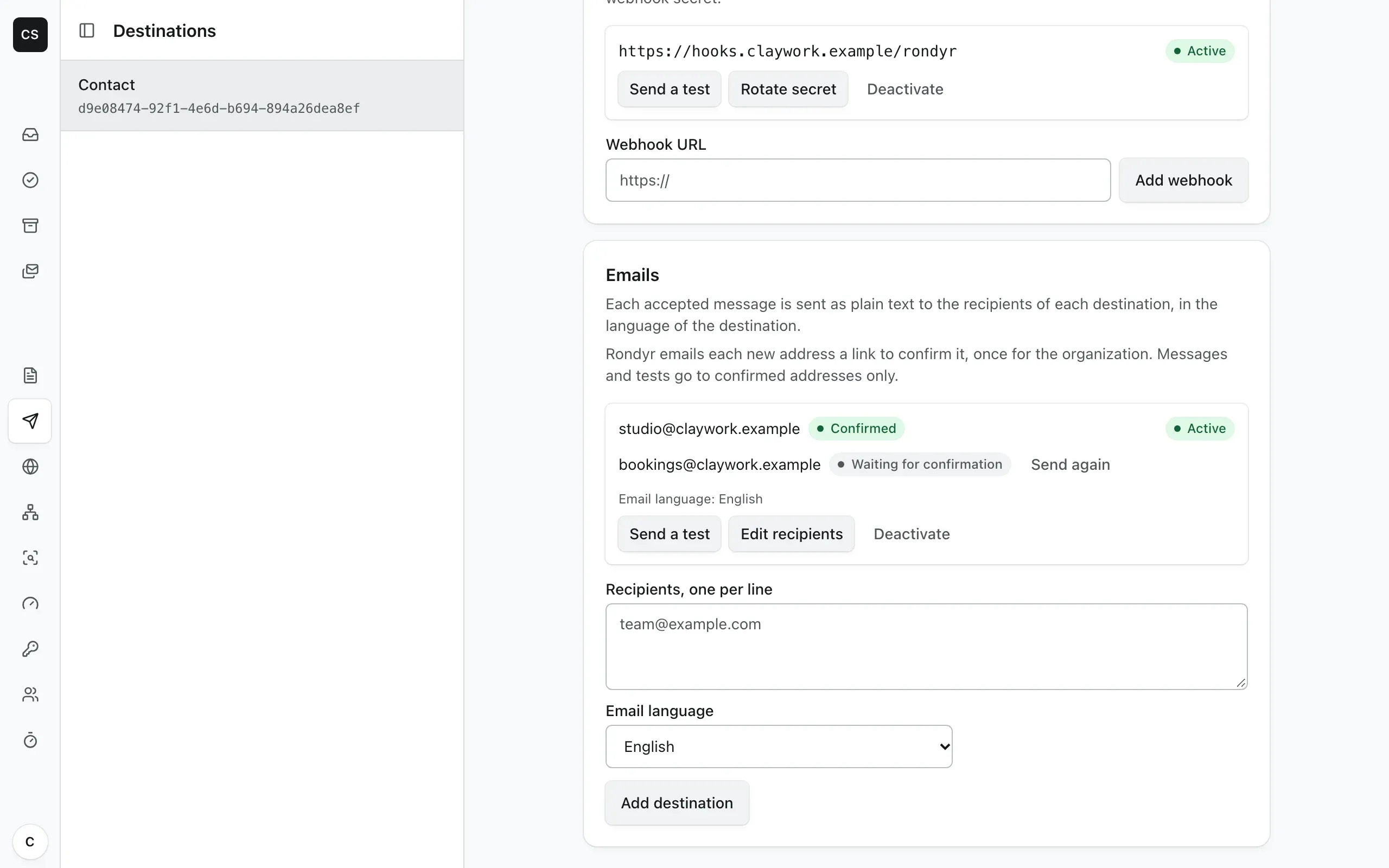
Messages accepted before you create (or reactivate) an email destination aren’t sent to it retroactively.
3. Confirm each recipient
Rondyr only sends form messages to addresses whose owners have opted in. When you add an address for the first time in an organization, Rondyr emails it a single-use confirmation link valid for 7 days.
- The recipient opens the link and selects Confirm my address.
- Once confirmed, their badge in Destinations switches from Waiting for confirmation to Confirmed.
- If an email was missed or expired, select Send again next to the address (up to 3 confirmation emails per address per UTC day).
An address is confirmed once per organization and then works across all forms in that organization. Deliveries and test emails go only to confirmed recipients; if no recipient on a destination has confirmed yet, the delivery fails with a note explaining that nobody has confirmed.
4. Send a test email
Select Send a test on the email destination to send a clearly labeled test message to its confirmed recipients. Rondyr waits up to 30 seconds and displays whether the provider accepted it or returned an error. Test sends don’t create an inbox message or a delivery record, and each destination allows up to 3 test sends per minute.
Email format and Reply-To
Every message goes out as plain text with no HTML, formatted in the destination’s chosen language:
From: forms@notifications.example.comTo: studio@claywork.exampleReply-To: customer@example.comSubject: New message: Contact
New message received through the form “Contact”.
email:customer@example.com
message:Is there room in the pottery class?
--Form: ContactReceived: 20 November 2026 at 14:03:00 UTCDelivery ID: 0f6c1a62-6b8e-4c43-9f5e-2d3a9b7c4e11
Rondyr may send the same delivery twice. Two messages with the same delivery ID are duplicates.
When a submission includes a field named email with a single valid address, Rondyr sets it as Reply-To so replying in your mail client writes straight back to the visitor.
Retries, limits, and privacy
- Automatic retries. If Resend or Cloudflare returns a temporary error, hits a rate limit, or times out, Rondyr retries automatically over several hours. Permanent rejections (such as an unverified sender domain or an invalid API key) fail right away. Once you fix the problem, retry any failed delivery from the message’s Deliveries section in Accepted.
- Duplicates. Resend deduplicates retries for 24 hours using the delivery ID; note that changing a destination’s recipients or
RONDYR_EMAIL_FROMwhile a retry is waiting causes Resend to reject that retry. Cloudflare Email Sending can occasionally send a duplicate if a request is interrupted; two emails with the same Delivery ID at the bottom are the same message. - Provider limits and cost. See Costs and limits for Resend and Cloudflare quotas and pricing. Keep in mind that each recipient counts as one email toward Resend’s 100/day free limit.
- Account emails. Once an email provider is configured, Rondyr also uses it to send team invitation links and password reset emails.
- Privacy. Your chosen email provider processes the contents of sent emails (Resend retains sent mail for 30 days on its free plan). If your forms collect personal data, list Resend or Cloudflare as a subprocessor (Resend DPA, Cloudflare DPA).