

Rondyr filters every message automatically with a classifier model (Jev or OpenAI Decisions), never deleting a real inquiry on a model’s guess. To block bots before they even reach the classifier, layer three quick settings on your form: a business description, a honeypot field, and Cloudflare Turnstile.
1. Describe your business
Open Settings → Forms, select your form, and edit Name and business with one or two plain sentences about what you do (for example, “Pottery studio in Lyon offering wheel-throwing workshops and handmade stoneware ceramics.”).
With a business description in place, the classifier checks three things on every message:
- Spam: mass solicitations, phishing, automated junk.
- Unsolicited sales outreach: someone trying to sell or pitch their own product, agency, guest post, or lead list to you, including indirect messages asking who handles marketing. Genuine quote requests, wholesale buyers, press inquiries, job applications, and peer partnerships aren’t flagged as sales outreach.
- Relevance: whether the message relates to your business. Without a business description, Rondyr skips the relevance check.
Anything that trips one of those checks goes to To review with a clear label instead of being deleted, so a real off-topic note (like “I found your keys outside your shop”) is still waiting for you.
Recognize your own domains
If teammates or colleagues occasionally test your forms or write from your company’s domain, open Settings → Organization domains and add up to 10 lowercase domain names (such as claywork.example). When a message arrives from that domain or one of its subdomains, Rondyr lets the classifier know it matches your organization’s domain.
2. Add a honeypot field
A honeypot is a field that real visitors never see and leave blank, while simple spam bots fill every input on the page. It adds zero friction for visitors.
- Open Settings → Forms, select your form, and scroll to Honeypot field.
- Enter a field name (for example
_hp) and select Save honeypot field. - Add a matching text input inside your site’s
<form>, hidden with CSS rather thantype="hidden", withtabindex="-1"andautocomplete="off":
<form action="https://forms.example.com/f/YOUR_PUBLIC_ID" method="post"> <input type="email" name="email" required /> <textarea name="message" required></textarea> <div aria-hidden="true" style="position: absolute; left: -10000px"> <label>Leave this field empty <input type="text" name="_hp" tabindex="-1" autocomplete="off" /></label> </div> <button type="submit">Send</button></form>When a visitor leaves _hp blank, Rondyr strips it out before saving the message. When a bot fills it in, Rondyr still returns the normal confirmation page or redirect (so the bot learns nothing), skips the AI classifier, and places the message in To review labeled Honeypot field filled. If a browser’s autofill accidentally fills it for a real person, you can still accept and forward the message from To review.
3. Add Cloudflare Turnstile
For persistent bots that ignore honeypots, attach a Cloudflare Turnstile widget to your form.
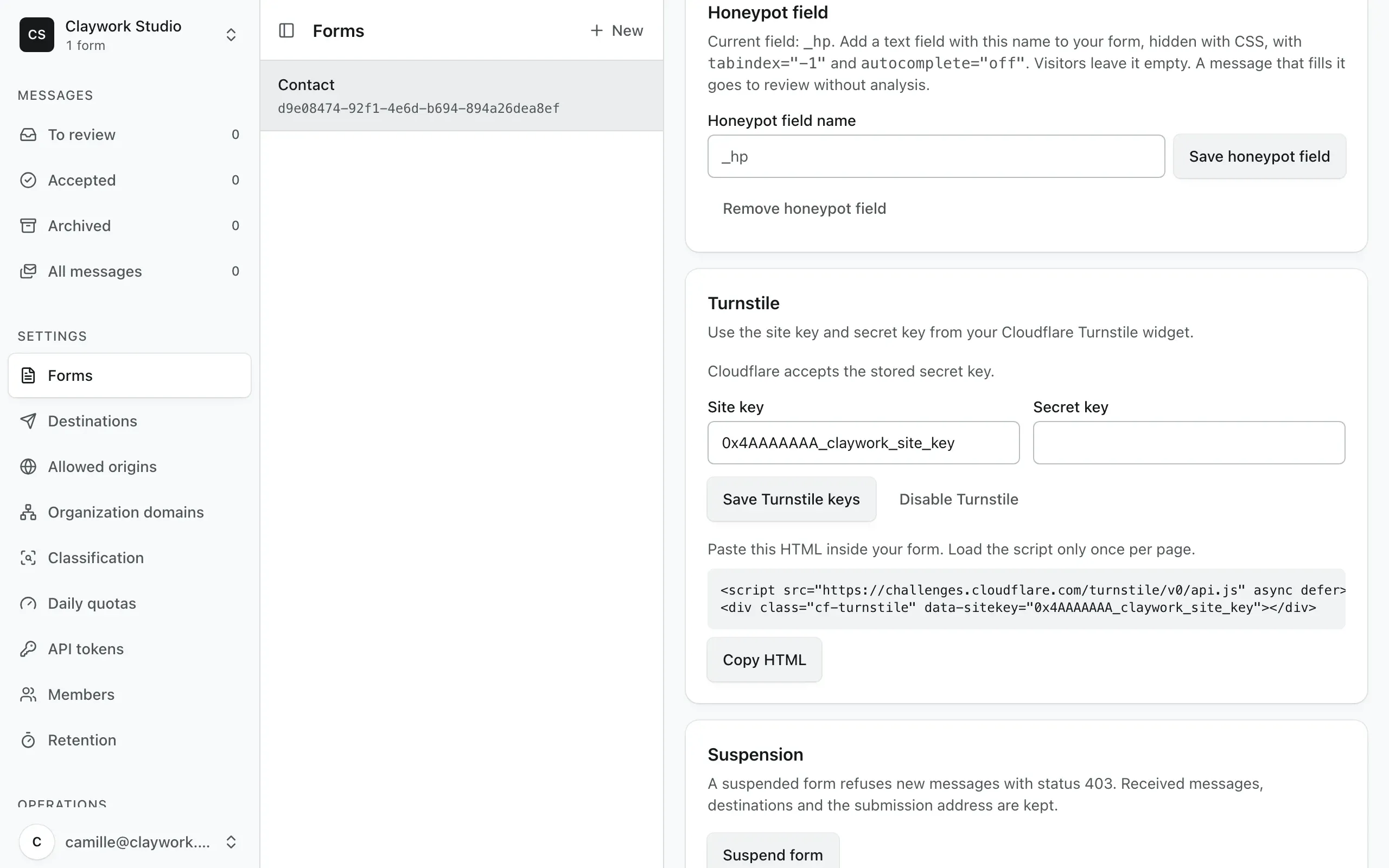
- In your Cloudflare dashboard, create a Turnstile widget for your website’s hostname and copy its Site key and Secret key.
- In Rondyr, open Settings → Forms, select your form, paste both keys under Turnstile, and select Save Turnstile keys. Rondyr checks the secret key with Cloudflare right away so typos are caught before saving.
- Select Copy HTML and paste the two lines inside your
<form>(load the Turnstile<script>only once per page). If you submit via JavaScript JSON, send the token in thecf-turnstile-responsefield. If your server forwards the post on the visitor’s behalf, opt in to Turnstile on server intake.
Rondyr removes the Turnstile token before saving the message. Submissions with a missing or invalid token go to To review labeled Turnstile verification failed without calling the AI classifier, while still returning the usual confirmation response to the visitor.
If Cloudflare’s verification service has a brief outage, Rondyr doesn’t block real visitors; messages fall back to normal AI classification. Each time you open a form’s settings in Forms, Rondyr re-checks your saved Turnstile secret key with Cloudflare and warns you on the Turnstile card if the widget was deleted or the key stopped working.
Repeat detection
Rondyr automatically spots repetitive spam across all forms in your organization over a rolling 30-day window. If Rondyr already received at least 2 earlier submissions with the same message content, or 3 from the same email address, new repeats skip the AI classifier and go straight to To review labeled Repeated submissions. A single accidental double-click stays under both limits.
Tune classification rules
Open Settings → Classification to adjust how strict the spam filter is for your organization. Changes apply to new messages only.
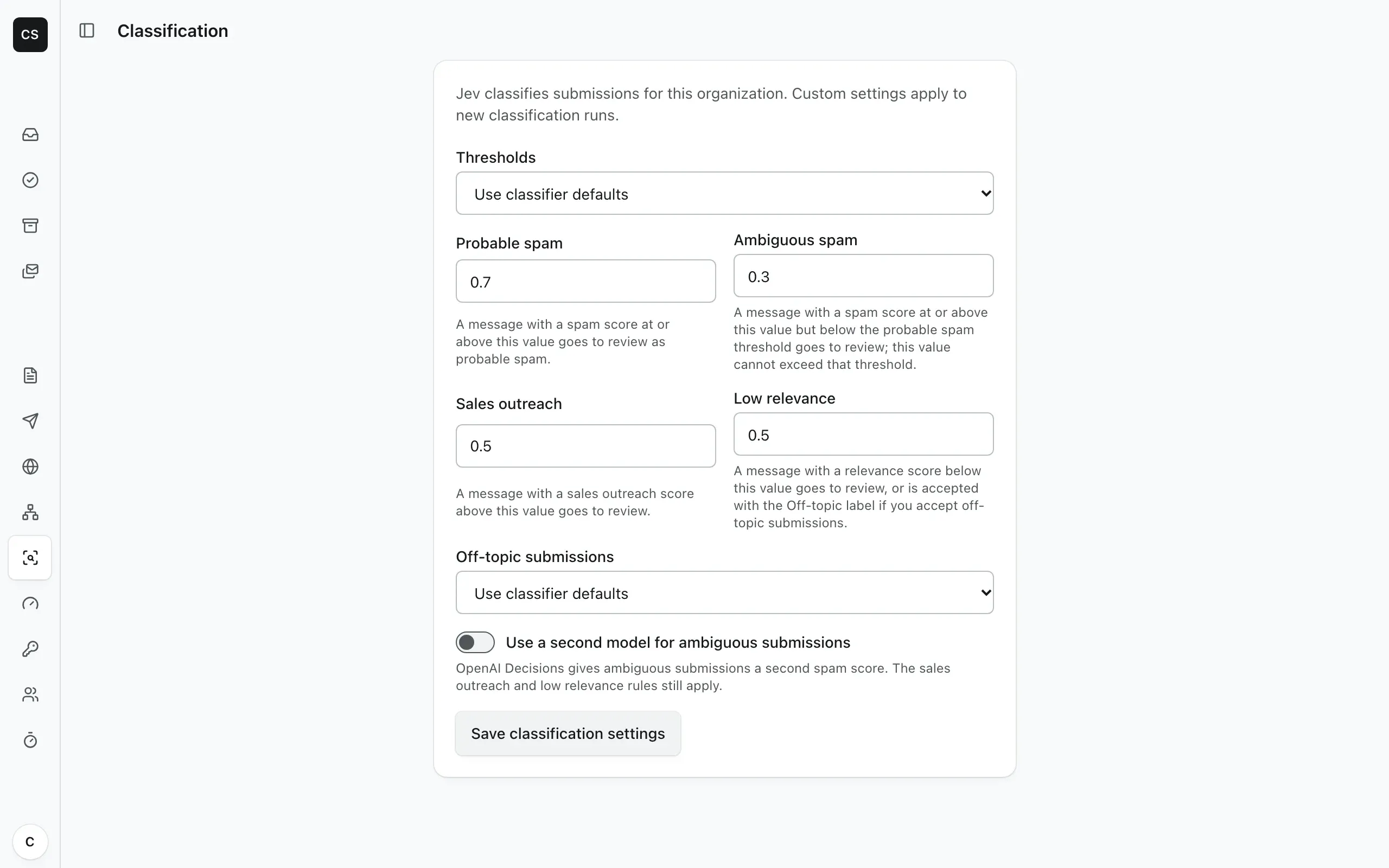
Each classifier scores a message from 0 to 1 on spam, sales outreach, and relevance. By default, a message is accepted automatically when:
- Spam is below
0.30(0.30to0.69goes to review as Uncertain classification;0.70and above as Probable spam). - Sales outreach is
0.50or lower (above0.50goes to review as Unsolicited sales outreach). - Relevance (when a business description is set) is at least
0.50with Jev, or0.45with OpenAI Decisions (below that goes to review as Unrelated to your business).
From Settings → Classification, an admin can:
- Set custom thresholds for all four rules (values from
0to1; ambiguous spam can’t exceed probable spam). - Accept off-topic messages automatically by switching Off-topic submissions to Accept with the Off-topic label. Messages that only failed the relevance check are then accepted, forwarded to your destinations, and tagged Off-topic in your inbox. Spam and sales outreach rules still apply first.
- Turn on a second model for ambiguous messages, when your instance has
RONDYR_ESCALATION_CLASSIFIERconfigured (see Classifier choice). The second model re-checks messages whose spam score fell in the uncertain range, using one extra slot from your daily classification quota. If the second model clears the spam doubt and the message passes sales outreach and relevance checks, Rondyr accepts it; otherwise it stays in To review.
Rate limits and daily quotas
Even without extra configuration, Rondyr enforces built-in caps to keep spam waves from overwhelming your forms or your bill:
- 5 submissions per minute per visitor on each form (counted by Cloudflare without Rondyr storing visitor IP addresses).
- 30 submissions per minute per form across all visitors.
- Daily organization quotas under Settings → Daily quotas (default: 2,000 submissions, 1,000 AI classifications, and 2,000 junk submissions caught at intake per UTC day).
Junk caught at intake (honeypot, failed Turnstile, or repeated submissions) counts against its own daily allowance rather than your regular submission limit, so a bot wave can’t block real visitors. Once your daily AI classification quota is full, real submissions are still accepted by your form and placed in To review labeled Daily classification quota reached instead of being lost. See Costs and limits for adjusting these limits.